
Please follow these steps:
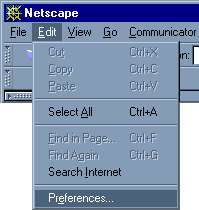
1. Select Preferences... from the Edit pull-down menu.
2. Open the Mail & Groups section, and Click on Mail Server
- For POP3 User Name: enter your user name (or pop account user name) your user name@yourdomain.com.
- For Outgoing Mail Server: enter mail.yourdomain.com
- For Incoming Mail Server: enter mail.yourdomain.com
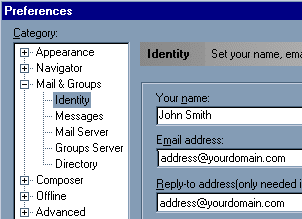
3. Click on the Identity in left column.
- For Your Name: enter your name.
- For Email Address: enter the email address for the POP mailbox.
- For Reply-to Address: enter address that you would like to be your return address.
All the other settings are optional. Choosing Messenger Mailbox from the Communicator pull-down menu will open the part of Netscape that allows you to read and send mail.
